


ClickUp connector
OAuth 2.0 project_managementConnect to ClickUp. Manage tasks, projects, workspaces, and team collaboration
ClickUp connector
-
Install the SDK
Section titled “Install the SDK”Terminal window npm install @scalekit-sdk/nodeTerminal window pip install scalekit -
Set your credentials
Section titled “Set your credentials”Add your Scalekit credentials to your
.envfile. Find values in app.scalekit.com > Developers > API Credentials..env SCALEKIT_ENVIRONMENT_URL=<your-environment-url>SCALEKIT_CLIENT_ID=<your-client-id>SCALEKIT_CLIENT_SECRET=<your-client-secret> -
Set up the connector
Section titled “Set up the connector”Register your ClickUp credentials with Scalekit so it handles the token lifecycle. You do this once per environment.
Dashboard setup steps
Register your Scalekit environment with the ClickUp connector so Scalekit handles the authentication flow and token lifecycle for you. The connection name you create will be used to identify and invoke the connection programmatically. Then complete the configuration in your application as follows:
-
Set up auth redirects
-
In Scalekit dashboard, go to AgentKit > Connections > Create Connection. Find ClickUp and click Create. Copy the redirect URI. It looks like
https://<SCALEKIT_ENVIRONMENT_URL>/sso/v1/oauth/<CONNECTION_ID>/callback.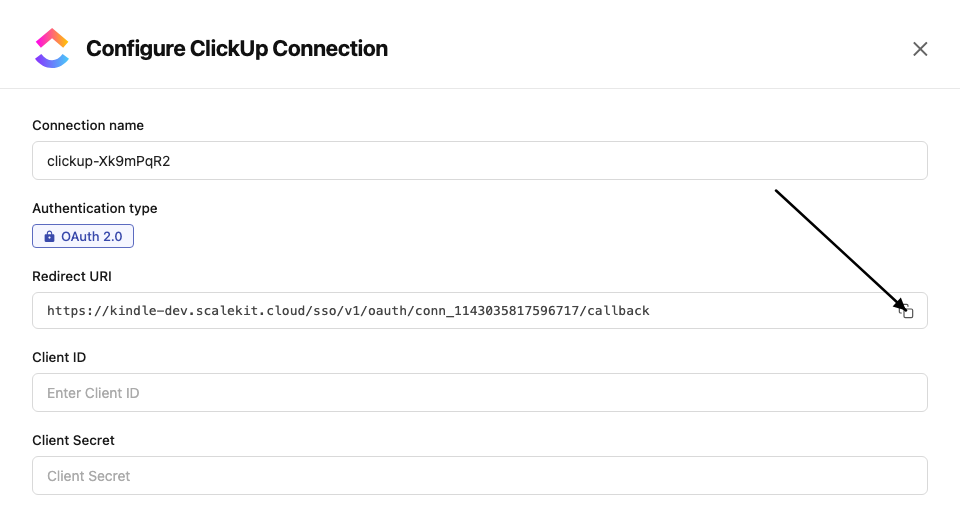
-
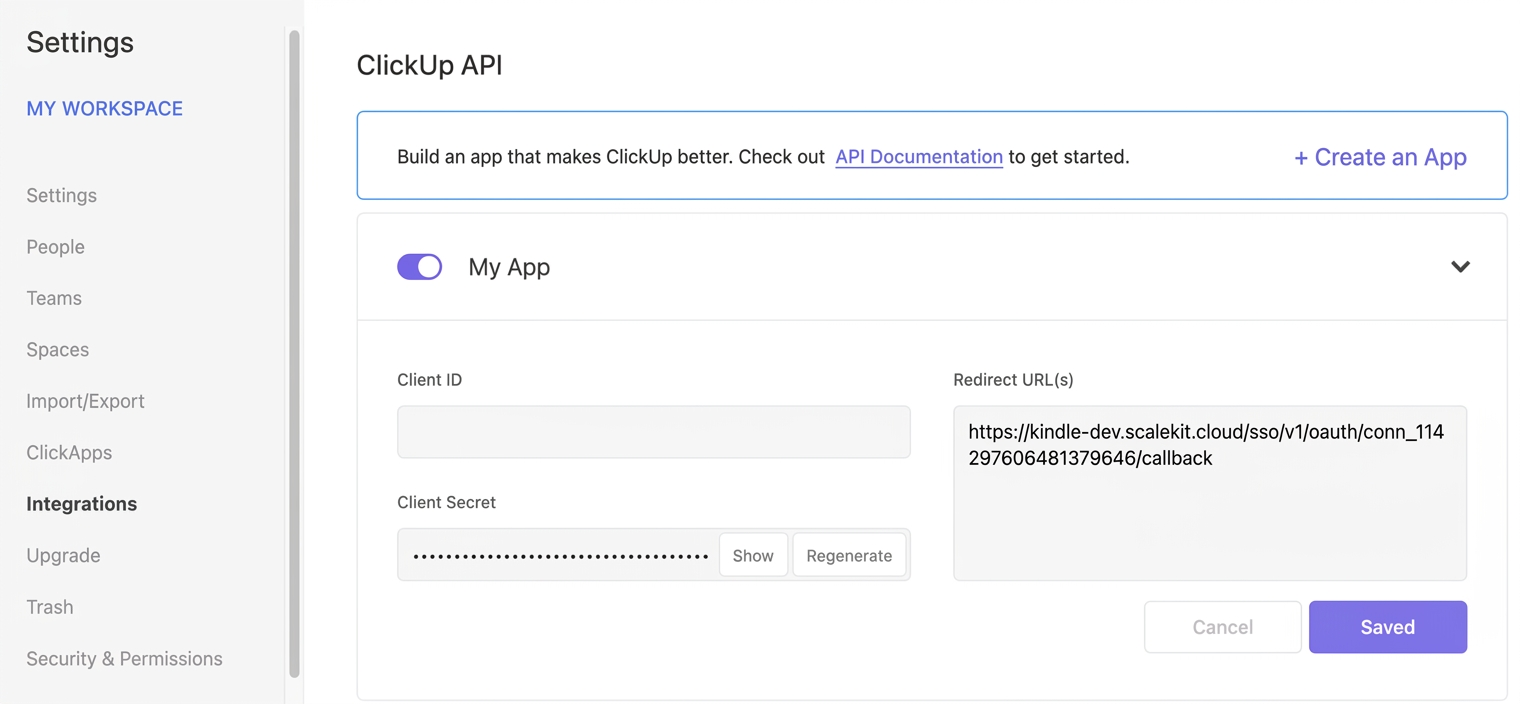
In ClickUp, click your Workspace avatar (lower-left corner) → Settings → Integrations → ClickUp API.
-
Open your application and paste the copied URI under Redirect URL(s), then save.
-
-
Get client credentials
On your ClickUp application page (Settings → Integrations → ClickUp API):
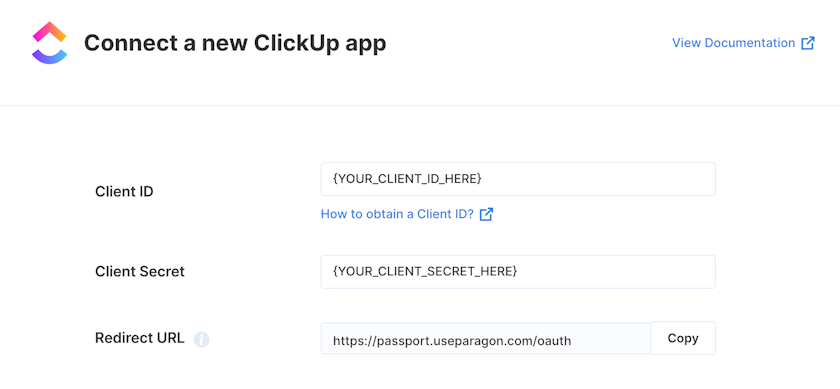
- Client ID — found under Client ID on your app page
- Client Secret — found under Client Secret on your app page
-
Add credentials in Scalekit
-
In Scalekit dashboard, go to AgentKit > Connections and open the connection you created.
-
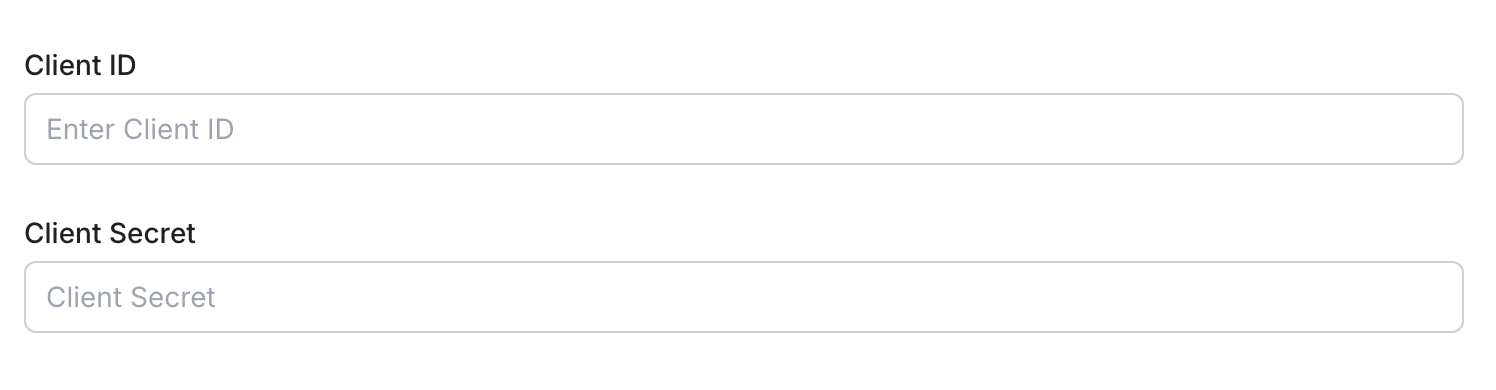
Enter your credentials:
- Client ID (from your ClickUp app page)
- Client Secret (from your ClickUp app page)
-
Click Save.
-
-
Connect a user account
- Click the Connected Accounts tab, then Add Account.
- Enter your user’s ID and click Create Account — you’ll be redirected to ClickUp to authorize access.
-
-
Authorize and make your first call
Section titled “Authorize and make your first call”quickstart.ts import { ScalekitClient } from '@scalekit-sdk/node'import 'dotenv/config'const scalekit = new ScalekitClient(process.env.SCALEKIT_ENV_URL,process.env.SCALEKIT_CLIENT_ID,process.env.SCALEKIT_CLIENT_SECRET,)const actions = scalekit.actionsconst connector = 'clickup'const identifier = 'user_123'// Generate an authorization link for the userconst { link } = await actions.getAuthorizationLink({ connectionName: connector, identifier })console.log('Authorize ClickUp:', link)process.stdout.write('Press Enter after authorizing...')await new Promise(r => process.stdin.once('data', r))// Make your first callconst result = await actions.executeTool({connector,identifier,toolName: 'clickup_user_get',toolInput: {},})console.log(result)quickstart.py import osfrom scalekit.client import ScalekitClientfrom dotenv import load_dotenvload_dotenv()scalekit_client = ScalekitClient(env_url=os.getenv("SCALEKIT_ENV_URL"),client_id=os.getenv("SCALEKIT_CLIENT_ID"),client_secret=os.getenv("SCALEKIT_CLIENT_SECRET"),)actions = scalekit_client.actionsconnection_name = "clickup"identifier = "user_123"# Generate an authorization link for the userlink_response = actions.get_authorization_link(connection_name=connection_name,identifier=identifier,)print("Authorize ClickUp:", link_response.link)input("Press Enter after authorizing...")# Make your first callresult = actions.execute_tool(tool_input={},tool_name="clickup_user_get",connection_name=connection_name,identifier=identifier,)print(result)
What you can do
Section titled “What you can do”Connect this agent connector to let your agent:
- Get comment, folder, space — Retrieve comments on a ClickUp task
- Delete space, space tag, comment — Permanently delete a ClickUp space from your workspace
- Create time entry, checklist item, webhook — Log a time entry for a task in a ClickUp Workspace
- Update task, goal, webhook — Update an existing ClickUp task
- List update, space views, view tasks — Update an existing ClickUp list
- Search task — Search and filter tasks across an entire ClickUp workspace (team)
Common workflows
Section titled “Common workflows”Proxy API call
const result = await actions.request({ connectionName: 'clickup', identifier: 'user_123', path: '/api/v2/user', method: 'GET',});console.log(result);result = actions.request( connection_name='clickup', identifier='user_123', path="/api/v2/user", method="GET")print(result)Execute a tool
const result = await actions.executeTool({ connector: 'clickup', identifier: 'user_123', toolName: 'clickup_list', toolInput: {},});console.log(result);result = actions.execute_tool( tool_input={}, tool_name='clickup_list', connection_name='clickup', identifier='user_123',)print(result)Tool list
Section titled “Tool list”Use the exact tool names from the Tool list below when you call execute_tool. If you’re not sure which name to use, list the tools available for the current user first.
clickup_checklist_item_create
#
Add a new item to an existing ClickUp task checklist. 3 params
Add a new item to an existing ClickUp task checklist.
checklist_id string required Checklist ID (UUID) name string required Item label assignee integer optional User ID to assign to this item clickup_comment_create
#
Add a new comment to a ClickUp task. Supports assigning the comment to a user and sending notifications. 4 params
Add a new comment to a ClickUp task. Supports assigning the comment to a user and sending notifications.
comment_text string required The content of the comment notify_all boolean required When true, notifies the comment creator in addition to other watchers task_id string required The unique identifier of the task to comment on assignee integer optional User ID to assign this comment to clickup_comment_create_list
#
Add a new comment to a ClickUp list. Supports assigning the comment to a user and sending notifications. 4 params
Add a new comment to a ClickUp list. Supports assigning the comment to a user and sending notifications.
assignee integer required User ID to assign this comment to comment_text string required The content of the comment list_id string required The unique identifier of the list to comment on notify_all boolean required When true, also notifies the comment creator clickup_comment_delete
#
Permanently delete a ClickUp comment by comment ID. This action cannot be undone. 1 param
Permanently delete a ClickUp comment by comment ID. This action cannot be undone.
comment_id string required The unique identifier of the comment to delete clickup_comment_get_list
#
Retrieve comments on a ClickUp list. Returns up to 25 most recent comments by default. Use start and start_id for pagination. 3 params
Retrieve comments on a ClickUp list. Returns up to 25 most recent comments by default. Use start and start_id for pagination.
list_id string required The unique identifier of the list start integer optional Unix timestamp in milliseconds of a reference comment for pagination start_id string optional ID of a reference comment for pagination clickup_comment_get_task
#
Retrieve comments on a ClickUp task. Returns up to 25 most recent comments. Use start and start_id for pagination. 3 params
Retrieve comments on a ClickUp task. Returns up to 25 most recent comments. Use start and start_id for pagination.
task_id string required The unique identifier of the task start integer optional Unix timestamp in milliseconds of a reference comment for pagination start_id string optional ID of a reference comment for pagination clickup_comment_update
#
Update an existing ClickUp comment. Supports changing comment text, assignee, and resolved status. 4 params
Update an existing ClickUp comment. Supports changing comment text, assignee, and resolved status.
assignee integer required User ID to assign this comment to comment_id string required The unique identifier of the comment to update comment_text string required New text content for the comment resolved boolean required Whether the comment is marked as resolved clickup_folder_create
#
Create a new folder within a ClickUp space to organize lists and tasks. 2 params
Create a new folder within a ClickUp space to organize lists and tasks.
name string required The name for the new folder space_id string required The ID of the space to create the folder in clickup_folder_delete
#
Permanently delete a ClickUp folder. This action cannot be undone. 1 param
Permanently delete a ClickUp folder. This action cannot be undone.
folder_id string required The unique identifier of the folder to delete clickup_folder_get
#
Retrieve details of a specific ClickUp folder by folder ID, including the lists it contains. 1 param
Retrieve details of a specific ClickUp folder by folder ID, including the lists it contains.
folder_id string required The unique identifier of the folder clickup_folder_get_all
#
Retrieve all folders within a ClickUp space. Optionally filter to include archived folders. 2 params
Retrieve all folders within a ClickUp space. Optionally filter to include archived folders.
space_id string required The unique identifier of the space archived boolean optional Include archived folders in results clickup_folder_update
#
Rename an existing ClickUp folder. 2 params
Rename an existing ClickUp folder.
folder_id string required The unique identifier of the folder to update name string required New name for the folder clickup_goal_create
#
Create a new goal in a ClickUp workspace. Goals help track high-level objectives with due dates and owner assignments. 6 params
Create a new goal in a ClickUp workspace. Goals help track high-level objectives with due dates and owner assignments.
color string required Color for the goal (hex code) description string required Description of the goal due_date integer required Due date as Unix timestamp in milliseconds multiple_owners boolean required Allow multiple owners for this goal name string required Name of the goal team_id string required The workspace (team) ID clickup_goal_delete
#
Remove a Goal from a ClickUp Workspace. 1 param
Remove a Goal from a ClickUp Workspace.
goal_id string required Goal ID (UUID) clickup_goal_get
#
Retrieve the details of a ClickUp Goal including its targets. 1 param
Retrieve the details of a ClickUp Goal including its targets.
goal_id string required Goal ID (UUID) clickup_goal_get_all
#
Retrieve all goals in a ClickUp workspace. Optionally filter to include or exclude completed goals. 2 params
Retrieve all goals in a ClickUp workspace. Optionally filter to include or exclude completed goals.
team_id string required The workspace (team) ID include_completed boolean optional Include completed goals in results (defaults to true) clickup_goal_update
#
Update an existing ClickUp goal. Supports renaming, changing due date, description, color, and managing owners. 5 params
Update an existing ClickUp goal. Supports renaming, changing due date, description, color, and managing owners.
color string required Updated color for the goal (hex code) description string required Updated description of the goal due_date integer required Updated due date as Unix timestamp in milliseconds goal_id string required The unique identifier (UUID) of the goal to update name string required New name for the goal clickup_list_create
#
Create a new list within a ClickUp folder. Supports setting name, description, due date, priority, and assignee. 6 params
Create a new list within a ClickUp folder. Supports setting name, description, due date, priority, and assignee.
folder_id string required The ID of the folder to create the list in name string required The name for the new list assignee integer optional User ID to assign to the list content string optional Description of the list due_date integer optional Due date for the list as Unix timestamp in milliseconds priority integer optional Priority level: 1 (urgent), 2 (high), 3 (normal), 4 (low) clickup_list_create_folderless
#
Create a new list directly within a ClickUp space (not inside a folder). Useful for top-level organization. 5 params
Create a new list directly within a ClickUp space (not inside a folder). Useful for top-level organization.
name string required The name for the new list space_id string required The ID of the space to create the list in content string optional Description of the list due_date integer optional Due date as Unix timestamp in milliseconds priority integer optional Priority level: 1 (urgent), 2 (high), 3 (normal), 4 (low) clickup_list_delete
#
Permanently delete a ClickUp list and all its contents. This action cannot be undone. 1 param
Permanently delete a ClickUp list and all its contents. This action cannot be undone.
list_id string required The unique identifier of the list to delete clickup_list_get
#
Retrieve details of a specific ClickUp list by list ID. 1 param
Retrieve details of a specific ClickUp list by list ID.
list_id string required The unique identifier of the list clickup_list_get_all
#
Retrieve all lists within a ClickUp folder. Optionally filter to include or exclude archived lists. 2 params
Retrieve all lists within a ClickUp folder. Optionally filter to include or exclude archived lists.
folder_id string required The unique identifier of the folder archived boolean optional Include archived lists in results clickup_list_get_folderless
#
Retrieve all lists in a ClickUp space that are not inside a folder. These are top-level lists within the space. 2 params
Retrieve all lists in a ClickUp space that are not inside a folder. These are top-level lists within the space.
space_id string required The unique identifier of the space archived boolean optional Include archived lists in results clickup_list_members_list
#
Retrieve Workspace members who have explicit access to a specific ClickUp List. 1 param
Retrieve Workspace members who have explicit access to a specific ClickUp List.
list_id integer required List ID clickup_list_update
#
Update an existing ClickUp list. Supports renaming, updating description, due date, priority, assignee, and status color. 6 params
Update an existing ClickUp list. Supports renaming, updating description, due date, priority, assignee, and status color.
list_id string required The unique identifier of the list to update name string required New name for the list content string optional Updated description for the list due_date integer optional Updated due date as Unix timestamp in milliseconds priority integer optional Priority level: 1 (urgent), 2 (high), 3 (normal), 4 (low) unset_status boolean optional Set to true to remove the list color clickup_list_views_list
#
Retrieve all views in a ClickUp List. 1 param
Retrieve all views in a ClickUp List.
list_id integer required List ID clickup_space_create
#
Create a new space within a ClickUp workspace. Spaces are the top-level organizational units that contain folders and lists. 3 params
Create a new space within a ClickUp workspace. Spaces are the top-level organizational units that contain folders and lists.
multiple_assignees boolean required Allow multiple assignees on tasks in this space name string required The name for the new space team_id string required The workspace (team) ID to create the space in clickup_space_delete
#
Permanently delete a ClickUp space from your workspace. This action cannot be undone. 1 param
Permanently delete a ClickUp space from your workspace. This action cannot be undone.
space_id string required The unique identifier of the space to delete clickup_space_get
#
Retrieve details of a specific ClickUp space by space ID. 1 param
Retrieve details of a specific ClickUp space by space ID.
space_id string required The unique identifier of the space clickup_space_get_all
#
Retrieve all spaces available in a ClickUp workspace (team). Optionally include archived spaces. 2 params
Retrieve all spaces available in a ClickUp workspace (team). Optionally include archived spaces.
team_id string required The workspace (team) ID archived boolean optional Include archived spaces in results clickup_space_tag_create
#
Create a new tag in a ClickUp Space. 4 params
Create a new tag in a ClickUp Space.
space_id string required Space ID tag_name string required Tag name tag_bg string optional Background color (hex) tag_fg string optional Foreground color (hex) clickup_space_tag_delete
#
Remove a tag from a ClickUp Space. 4 params
Remove a tag from a ClickUp Space.
space_id string required Space ID tag_name string required Tag name to delete tag_bg string optional Background color (hex) tag_fg string optional Foreground color (hex) clickup_space_tags_list
#
Retrieve all task tags available in a ClickUp Space. 1 param
Retrieve all task tags available in a ClickUp Space.
space_id string required Space ID clickup_space_update
#
Update an existing ClickUp space. Supports renaming, changing color, privacy settings, and enabling multiple assignees. 5 params
Update an existing ClickUp space. Supports renaming, changing color, privacy settings, and enabling multiple assignees.
color string required Color for the space (hex code) multiple_assignees boolean required Allow multiple assignees on tasks name string required New name for the space private boolean required Whether this space is private space_id string required The unique identifier of the space to update clickup_space_views_list
#
Retrieve all views in a ClickUp Space. 1 param
Retrieve all views in a ClickUp Space.
space_id integer required Space ID clickup_task_checklist_create
#
Add a new checklist to a ClickUp task. 4 params
Add a new checklist to a ClickUp task.
name string required Checklist name task_id string required Task ID custom_task_ids boolean optional Use custom task IDs team_id integer optional Workspace ID (required if custom_task_ids=true) clickup_task_create
#
Create a new task in a ClickUp list. Supports setting name, description, assignees, status, priority, due date, start date, and more. 9 params
Create a new task in a ClickUp list. Supports setting name, description, assignees, status, priority, due date, start date, and more.
list_id string required The ID of the list to create the task in name string required The name or title of the task description string optional Plain text description of the task due_date integer optional Due date as Unix timestamp in milliseconds notify_all boolean optional When true, notifies task creator and all assignees/watchers parent string optional ID of a parent task to create this as a subtask priority integer optional Priority level: 1 (urgent), 2 (high), 3 (normal), 4 (low) start_date integer optional Start date as Unix timestamp in milliseconds status string optional The status of the task (must match a status in the list) clickup_task_create_from_template
#
Create a new ClickUp task using an existing task template. The template must be added to your workspace before use. 3 params
Create a new ClickUp task using an existing task template. The template must be added to your workspace before use.
list_id string required The ID of the list where the task will be created name string required The name for the new task being created from the template template_id string required The ID of the task template to use clickup_task_delete
#
Permanently delete a ClickUp task by task ID. This action cannot be undone. 1 param
Permanently delete a ClickUp task by task ID. This action cannot be undone.
task_id string required The unique identifier of the task to delete clickup_task_get
#
Retrieve details of a specific ClickUp task by task ID. Returns task properties, assignees, status, dates, and custom fields. 3 params
Retrieve details of a specific ClickUp task by task ID. Returns task properties, assignees, status, dates, and custom fields.
task_id string required The unique identifier of the task include_markdown_description boolean optional Return task description in Markdown format include_subtasks boolean optional Include subtasks in the response clickup_task_list
#
Retrieve tasks from a specific ClickUp list. Supports filtering by status, assignee, tags, and date ranges. Returns up to 100 tasks per page. 7 params
Retrieve tasks from a specific ClickUp list. Supports filtering by status, assignee, tags, and date ranges. Returns up to 100 tasks per page.
list_id string required The ID of the list to retrieve tasks from archived boolean optional Return archived tasks include_closed boolean optional Include closed tasks in the results order_by string optional Field to sort tasks by: id, created, updated, or due_date page integer optional Page number for pagination (starts at 0) reverse boolean optional Display results in reverse order subtasks boolean optional Include subtasks in the results clickup_task_members_list
#
Retrieve Workspace members who have access to a specific ClickUp task. 1 param
Retrieve Workspace members who have access to a specific ClickUp task.
task_id string required Task ID clickup_task_search
#
Search and filter tasks across an entire ClickUp workspace (team). Supports filtering by spaces, lists, folders, statuses, assignees, tags, and date ranges. 8 params
Search and filter tasks across an entire ClickUp workspace (team). Supports filtering by spaces, lists, folders, statuses, assignees, tags, and date ranges.
team_id string required The workspace (team) ID to search tasks within due_date_gt integer optional Filter tasks with due date greater than this Unix timestamp in milliseconds due_date_lt integer optional Filter tasks with due date less than this Unix timestamp in milliseconds include_closed boolean optional Include closed tasks in the results order_by string optional Sort field: id, created, updated, or due_date page integer optional Page number for pagination (starts at 0) reverse boolean optional Display results in reverse order subtasks boolean optional Include subtasks in the results clickup_task_update
#
Update an existing ClickUp task. Supports updating name, description, status, priority, due date, start date, and other fields. 9 params
Update an existing ClickUp task. Supports updating name, description, status, priority, due date, start date, and other fields.
task_id string required The unique identifier of the task to update archived boolean optional Set to true to archive the task description string optional Updated task description. Use a space character to clear the description. due_date integer optional Due date as Unix timestamp in milliseconds name string optional New name for the task priority integer optional Priority level: 1 (urgent), 2 (high), 3 (normal), 4 (low) start_date integer optional Start date as Unix timestamp in milliseconds status string optional New status for the task time_estimate integer optional Time estimate in milliseconds clickup_time_entries_list
#
Retrieve time entries within a date range for a ClickUp Workspace. 9 params
Retrieve time entries within a date range for a ClickUp Workspace.
team_id string required Workspace ID assignee integer optional Filter by user ID end_date integer optional End date (Unix ms) folder_id integer optional Filter by folder ID is_billable boolean optional Filter by billable status list_id integer optional Filter by list ID space_id integer optional Filter by space ID start_date integer optional Start date (Unix ms) task_id string optional Filter by task ID clickup_time_entry_create
#
Log a time entry for a task in a ClickUp Workspace. 7 params
Log a time entry for a task in a ClickUp Workspace.
duration integer required Duration in milliseconds start integer required Start timestamp (Unix ms) team_id string required Workspace ID assignee integer optional User ID to assign entry to billable boolean optional Mark as billable description string optional Time entry description tid string optional Task ID to associate with clickup_user_get
#
Retrieve the details of the authenticated ClickUp user account. 0 params
Retrieve the details of the authenticated ClickUp user account.
clickup_view_tasks_list
#
Retrieve all tasks in a specific ClickUp view. 2 params
Retrieve all tasks in a specific ClickUp view.
view_id string required View ID page integer optional Page number (starts at 0) clickup_webhook_create
#
Create a new webhook in a ClickUp workspace to monitor specific events. Use '*' for the events field to subscribe to all events. 6 params
Create a new webhook in a ClickUp workspace to monitor specific events. Use '*' for the events field to subscribe to all events.
endpoint string required The URL that will receive webhook payloads events string required Comma-separated list of events to subscribe to, or '*' for all events team_id string required The workspace (team) ID list_id integer optional Filter webhook to a specific list ID space_id integer optional Filter webhook to a specific space ID task_id string optional Filter webhook to a specific task ID clickup_webhook_delete
#
Delete a ClickUp webhook, stopping it from monitoring events. This action cannot be undone. 1 param
Delete a ClickUp webhook, stopping it from monitoring events. This action cannot be undone.
webhook_id string required The unique identifier (UUID) of the webhook to delete clickup_webhook_get_all
#
Retrieve all webhooks created via the API for a ClickUp workspace. Only returns webhooks created by the authenticated user. 1 param
Retrieve all webhooks created via the API for a ClickUp workspace. Only returns webhooks created by the authenticated user.
team_id string required The workspace (team) ID clickup_webhook_update
#
Update an existing ClickUp webhook. Change the endpoint URL, subscribed events, or webhook status. 4 params
Update an existing ClickUp webhook. Change the endpoint URL, subscribed events, or webhook status.
endpoint string required New destination URL for the webhook events string required Events to subscribe to, or '*' for all events status string required Status of the webhook (active or inactive) webhook_id string required The unique identifier (UUID) of the webhook to update clickup_workspace_members_list
#
Retrieve all members in a ClickUp Workspace. 1 param
Retrieve all members in a ClickUp Workspace.
team_id string required Workspace ID clickup_workspace_seats_get
#
Retrieve seat utilization data for a ClickUp Workspace, showing member and guest seat counts. 1 param
Retrieve seat utilization data for a ClickUp Workspace, showing member and guest seat counts.
team_id string required Workspace ID clickup_workspaces_list
#
Retrieve all ClickUp Workspaces available to the authenticated user. 0 params
Retrieve all ClickUp Workspaces available to the authenticated user.